
Instead of linking to a general location or address, for search engine optimization (SEO) purposes, you want to instead link to the company's specific Google My Business location.
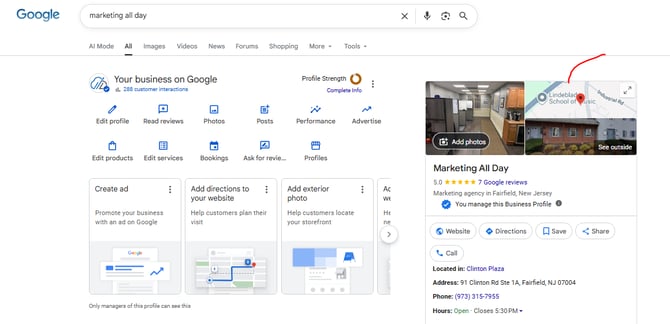
Step 1: Find the business listing on Google and Click on the map image
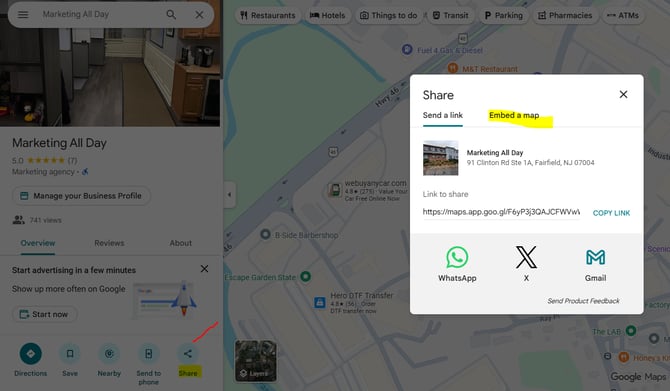
Step 2: Once the business opens up in Google Maps, Click Share on the listing, then Click Embed a Map
Step 3: Copy the HTML and paste it into the module and / or source code on your website where you want it embedded (likely via the Contact Us page).
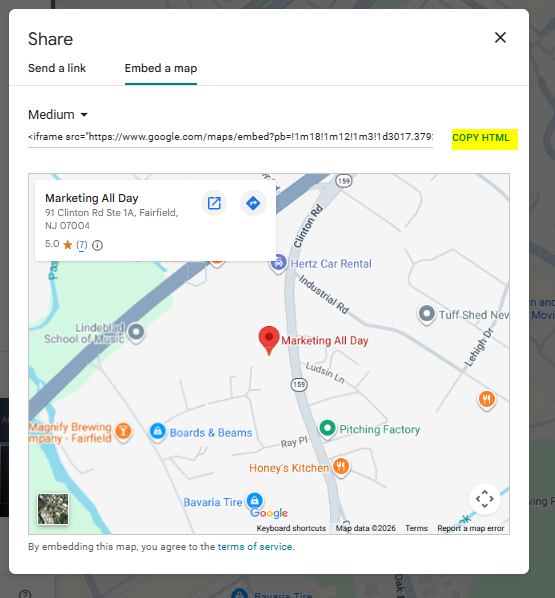
Note: If you are checking the map embed on a current page, and you do NOT see the company name like above, this means you are only linking to an address and the embed should be replaced following the instructions above.
Adjusting the Map Size With Embed Code (If Needed)
The map embed code you implemented in HubSpot may have issues with sizing. It may either appear too tall or too wide, may not fill up the entire space, or may only be showing part of the full map.
To avoid this issue, you'll want to use this adjusted version of the embed code that allows you to manipulate the size and view of the map to your liking:
<div style="position:relative; padding-top:40%;">
<iframe src="<insert embed code for company address" style="position:absolute; top:0; left:0; width:100%; height:100%; border:0;" loading="lazy" allowfullscreen referrerpolicy="no-referrer-when-downgrade"></iframe></div>
You'll want to make sure you copy over the embed string from Google you collected earlier is placed in between the brackets, as shown by the bolded and underlined text above.
The parameters you can adjust for the sizing and view of the map on HubSpot are also determined by the attributes in the string bolded and underlined above:
Padding-top (within Div tag): Determines the view of the map
Width/Height (within iFrame tag): Determines the size of the map
Note that setting the height and width to 100% will allow the map to fill the entire space the module allows.